Configuring authentication for outbound Market Transaction
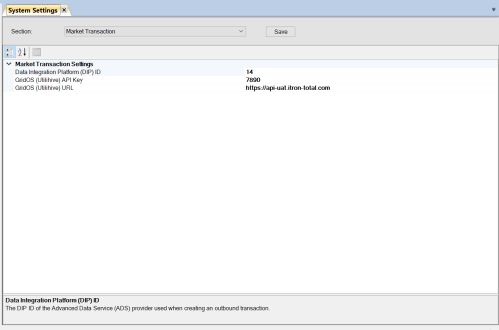
When sending outbound transactions, Market Transaction API sends the requests to GridOS (Utilihive) API. These requests need to be authenticated using an API key. To configure the Market Transaction API for communication with the GridOS (Utilihive) API, you must update the following settings during the installation process:
-
GridOS (Utilihive) API Key. This setting holds the API key used by the GridOS (Utilihive) API to authenticate the request. The Market Transaction API's request needs to be sent with this key to successfully authenticate.
-
GridOS (Utilihive) URL. This setting holds the URL address of the GridOS (Utilihive) API endpoint. The Market Transaction API sends the outbound transactions to this URL.
Important! The property values for these settings must be updated based on the environment in which the installation is being performed. After updating the settings, you must restart the service to ensure that the settings are updated and take effect.
Note: The GridOS (Utilihive) API Key and GridOS (Utilihive) URL settings are only applicable to Market Transaction.